UX Research Case Study

SafeYelli

Empowering safety through geospatial intelligence and community-driven insights.

Visit safeyelli.in
Role
Junior UX Researcher & Website Designer
Timeline
2021 – Ongoing
Team
2 UX Designers, 1 UX Researcher, 2 PMs
Platform
Web (Responsive)
Executive Summary

Project at a Glance

SafeYelli is an information website that empowers women to navigate urban India safely through real-time incident reporting, interactive heat mapping, and community-verified safety intelligence.

The Challenge: Women lacked access to comprehensive, real-time safety data when choosing routes in unfamiliar or high-risk areas. Existing tools didn't capture the lived reality of navigating urban streets — especially after dark.
Our Response: We designed a citizen-centric platform where the community reports, verifies, and shares safety data — turning individual experiences into collective intelligence.
50k+
Active users within 3 months
92%
Task success rate
40%
Faster than industry benchmark
Chapter 1: The Problem

Every Journey Should Feel Safe

In urban India, millions of women navigate a hidden map of fear every day. Streets that look safe by day transform at night. Popular routes become anxiety-filled journeys. This is the story of how we set out to change that.

The Challenge

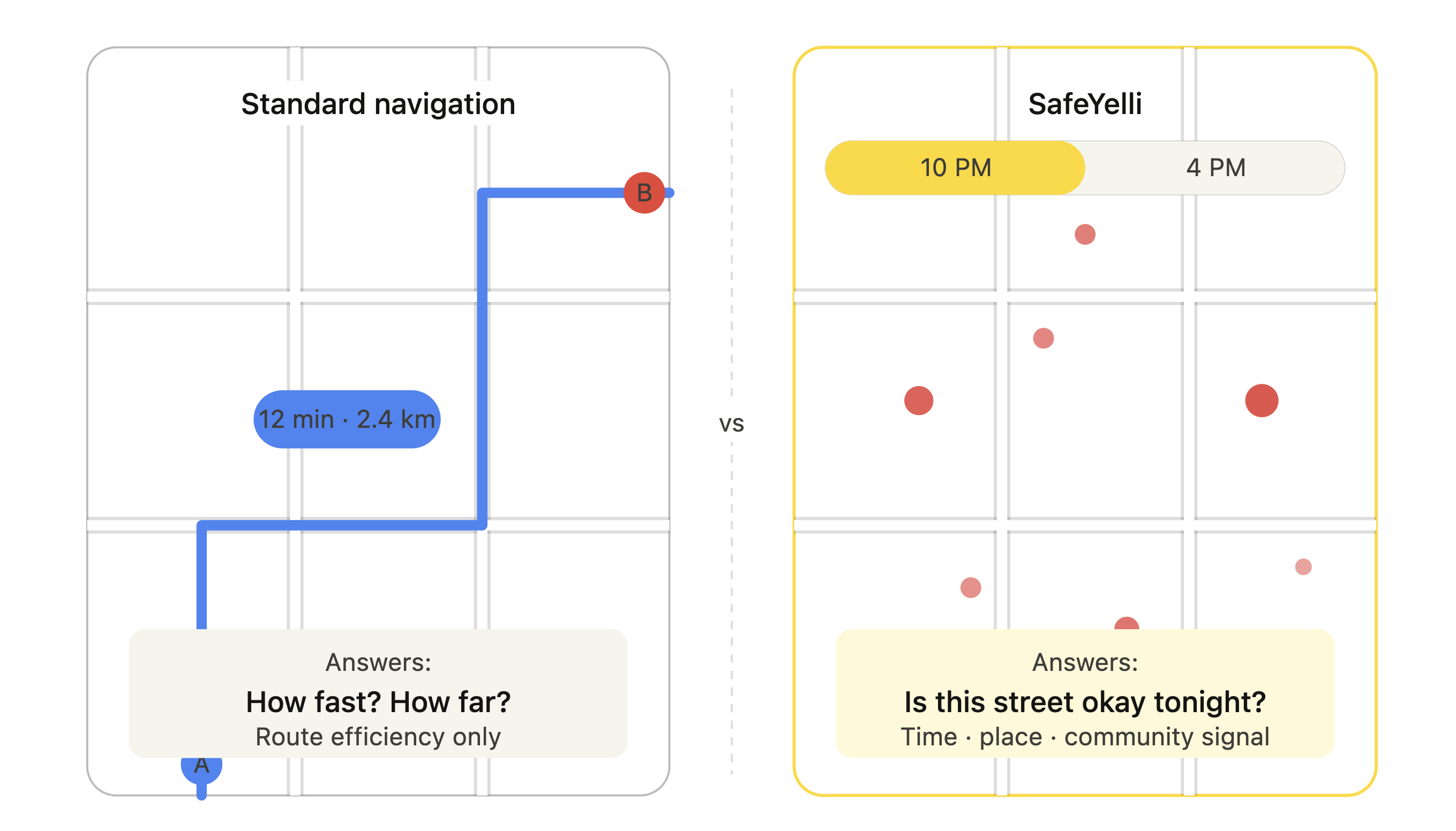
No comprehensive geospatial safety data. No real-time incident reporting. No way to know which streets are truly safe.

Our Users

Women aged 18–45 — students, working professionals navigating urban areas — each with unique safety concerns and daily routines.

Our Vision

A geospatial safety platform with real-time reporting, heat mapping, safe route suggestions, and community-verified ratings.

My Contributions to This Project

  • Led user research and designed the information architecture
  • Created user personas and journey maps from qualitative data
  • Designed and built the responsive website interface
  • Conducted usability testing and led validation studies across 3 rounds
Chapter 2: Personas

The Three Personas

Through 45 interviews and 1,247 survey responses, three distinct user archetypes emerged — each with a unique relationship to urban safety.

Persona 01 of 03
Ananya Patel
Ananya Patel
The College Student
21 years
Delhi
University Student
Stays in hostel
"

I need a simple way to let my parents know I'm safe in new areas. Current apps don't offer that.

Background

Pursuing master's degree while juggling internships and part-time work. Frequently explores new city areas. Her parents constantly worry, so she needs an easy way to share her location and safety status.

Tech Profile
Smartphone
5/5
Navigation
4/5
Social Sharing
5/5
Safety Tech
4/5
Early Adopter
3/5
Key Insight
Values independence but needs non-intrusive way to reassure family about safety
Wants & Needs
  • Easy way to share location with parents
  • Real-time safety updates in new areas
  • Quick access to emergency contacts
Frustrations
  • Parents' constant worry about safety
  • Uncertainty about safe areas in new city
  • Lack of real-time safety information
Persona 02 of 03
Priya Sharma
Priya Sharma
The Daily Commuter
28 years
Mumbai
Software Engineer
Lives alone
"

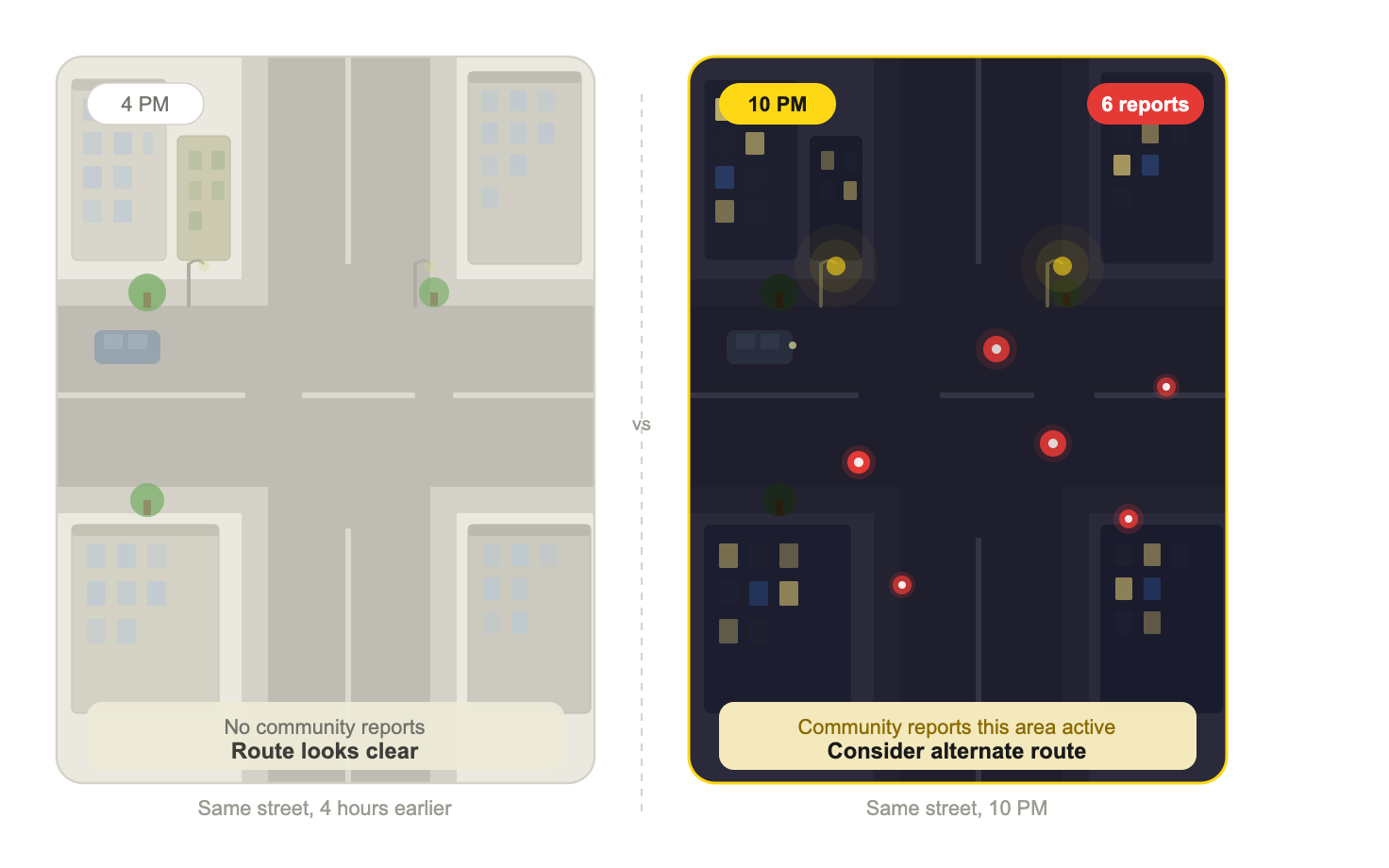
I need to know which areas are safe at 10 PM before I leave office. Current maps don't tell me that.

Background

Works late shifts at a tech company. Commutes 45 minutes daily using public transport. Has anxiety about evening commutes and needs real-time safety information to feel secure traveling home at night.

Tech Profile
Smartphone
5/5
Navigation
5/5
Social Sharing
4/5
Safety Tech
5/5
Early Adopter
4/5
Key Insight
Needs time-specific safety data that adapts to her 10 PM commute schedule
Wants & Needs
  • Find safest routes home after late-night work
  • Quick access to emergency contacts
  • Real-time safety updates during commute
Frustrations
  • Anxiety during evening commutes
  • Maps don't provide time-specific safety data
  • Uncertainty about safe ride-sharing locations
Persona 03 of 03
Meera Reddy
Meera Reddy
The Concerned Parent
42 years
Bangalore
School Teacher
Two teenage daughters
"

I want to keep my daughters safe without invading their privacy. I need a tool that helps us both feel secure.

Background

Balances teaching career with raising two teenage daughters in a rapidly growing city. Constantly worries about their safety as they become more independent. Seeks tools to monitor well-being without being overly intrusive.

Tech Profile
Smartphone
4/5
Navigation
3/5
Social Sharing
3/5
Safety Tech
5/5
Early Adopter
2/5
Key Insight
Needs to balance parental concern with respecting teenage independence and privacy
Wants & Needs
  • Track daughters' locations discreetly
  • Receive alerts about unsafe areas they visit
  • Easy communication with family members
Frustrations
  • Tracking apps feel invasive to teenagers
  • No way to know about area safety in real-time
  • Difficulty balancing safety and independence
Behavioral Insights

Common Behavioral Patterns

Despite diverse backgrounds, all three personas share critical safety behaviors that informed every design decision. These aren't edge cases — they're the norm.

89%
Avoid certain times
Modify schedules to avoid high-risk hours regardless of inconvenience.
92%
Share live location
Share location with trusted contacts when navigating unfamiliar areas.
87%
Informal networks
Rely on informal peer networks for safety information over official channels.
76%
Avoid solo travel
Avoid travelling alone at night, even for short distances they'd otherwise walk.

Design Implication

  • Safety must be the primary lens for every feature — not a secondary filter
  • Community and peer trust are more powerful than official data sources
  • Time-aware features are essential — safety perception is deeply temporal
  • Anonymous contribution lowers barrier to sharing sensitive experiences
Chapter 3: Discovery

Listening to Real Stories

We traveled across Bangalore, talking to women about their daily journeys. What we discovered went far beyond what any dataset could reveal. Every conversation unveiled patterns of fear, resilience, and adaptation.

UX Research Methods

We selected methods across all four quadrants to triangulate findings — combining behavioral observation with attitudinal data, and qualitative depth with quantitative scale.

Behavioral (What people do) Attitudinal (What people say) Qualitative (Why/How) Quantitative (How much/many) Contextual Inquiry Geospatial Analysis Diary Studies Focus Groups In-Depth Interviews Surveys Primary methods used Supporting methods

Key Research Insights

Three findings that shaped everything that followed.

83%
Alter Routes Weekly
Of women reported altering their routes or timing due to safety concerns at least once a week.
67%
Prefer Community Data
Preferred community-verified safety information over official crime statistics — seen as more honest and current.
91%
Want Geomapping
Would use a geomapping feature to plan safer routes if available in real-time.
Chapter 4: Quantitative Analysis

The Numbers Behind the Fear

Our survey of 1,247 women across 12 major metros revealed the scale and shape of the problem — and the appetite for a solution.

Participant Demographics

In Bangalore, 73% of respondents were working professionals.

Age 18–24
28%
Age 25–34
42%
Age 35–44
15%
Age 45+
5%

Feature Priority Rankings

Survey respondents ranked what mattered most — safety intersected every answer.

Feature Priority Rankings
Survey respondents: n=1,247
0 25 50 75 100
Real-time Safety Map
Route Safety Scores
Community Reports
Emergency SOS
Safe Route Suggestions
Time-based Alerts
Peer Reviews
% Currently Available
% Want This Feature
89%
Feel unsafe after 8 PM
Most critical window: 8–11 PM based on time-series analysis.
10+ min
Extra commute time
Women add 15–90 minutes daily to travel for safety considerations.
78%
Wish Maps had safety
Use Google Maps but wish it had a dedicated safety layer.
67%
Trust peer reviews
Community-driven content seen as more relevant and current than official stats.
92%
Would share anonymous data
Strong willingness to contribute if privacy is protected — community safety as a shared resource.
85%
Would pay for premium
Avg. willingness to pay: ₹199/month for peace of mind.
Market Opportunity Insight

Significant gap between desired features and current availability highlights untapped market opportunity. Emergency SOS has highest availability (45%) but still falls 51 percentage points short of demand. Real-time safety mapping and route scoring show 80%+ gaps — critical areas for innovation.

Key Validation Finding
74%
Safety concerns are widespread, not isolated
Of respondents experienced safety concerns at least monthly — this is a systemic issue affecting the majority.
100%
Safety is deeply temporal
All 45 interview participants emphasized that the same location feels completely different at different times of day.
45
Every participant confirmed the time dimension
Not one exception. Temporal safety assessment was the single most consistent finding across all interviews.

Survey Methodology & Validation

How we reached 1,247 respondents and ensured data quality.

Distribution Channels

Social media targeted ads 42%
Facebook, Instagram campaigns
Women's safety groups 28%
Online forums and communities
University student networks 18%
Campus partnerships
Professional workplace networks 12%
Corporate diversity groups

Quality Assurance

Attention Check Questions
Multiple validation questions embedded to ensure quality responses
Removed 287 Incomplete Responses
Filtered out 18.7% of submissions that didn't meet quality standards
Validated Against Census Data
Cross-referenced demographics with government statistics for accuracy
Statistical Confidence
Confidence level: 95%, margin of error: ±2.8%
Chapter 5: Qualitative Analysis

Patterns of Fear & Resilience

Forty-five interviews, conducted in English, Hindi, and Kannada, revealed something no survey could: women have built an entire invisible infrastructure of safety — informal, fragile, and exhausting.

"

We share safety info in WhatsApp groups. Imagine tapping into thousands of women's experiences.

A
Ananya
Student, Delhi
40/45

Community Sharing

Active information sharing via WhatsApp groups and informal networks — but no centralized platform.

33/45

Technology Trust

Privacy concerns about location tracking and potential data misuse were the primary barrier.

45/45

Time-Dependent Perceptions

Every single participant said safety perception changes dramatically based on time of day.

Universal

Route Adaptation

All participants had developed personal mental maps of safe vs. unsafe zones — none of this data was captured anywhere.

Critical Pain Points

1
No Real-Time Safety Context
Navigation apps don't provide safety information, forcing users to rely on gut feeling or outdated knowledge.
2
Fragmented Information Sources
Safety intel scattered across WhatsApp groups, word-of-mouth, and personal experience with no central repository.
3
Economic Impact of Safety Concerns
Career and life decisions constrained by safety considerations — job choices, living locations, social opportunities.
4
Mental Health Toll
Constant hyper-vigilance leads to anxiety, stress, and reduced quality of life. Several participants mentioned therapy for anxiety.

Design Opportunities

1
Integrate Safety Into Navigation
Build on existing Google Maps behavior by adding a safety layer — don't reinvent navigation, enhance it.
2
Community-Powered Intelligence
Leverage existing information-sharing behavior and formalize it into a trusted, verified system.
3
Temporal Awareness
Make time-of-day a first-class feature — safety scores that change based on when you're actually traveling.
4
Privacy-First Architecture
Address trust concerns upfront with anonymous reporting, optional tracking, and transparent data usage.

Interview Methodology

5-step qualitative analysis framework — conducted with 2 independent coders (Cohen's κ = 0.82) to ensure reliability.

1

Recording & Transcription

All 45 interviews recorded with consent and professionally transcribed verbatim.

2

Thematic Analysis

Affinity mapping with 2 independent coders — Cohen's κ = 0.82 reliability score.

3

Quantitative Coding

Themes coded and scored for frequency and intensity across participant groups.

4

Pattern Recognition

Cross-referencing attitudinal and behavioral data to identify design opportunities.

5

Validation

Findings validated back with a subset of participants in follow-up sessions.

Interview Guide

Six core question types, each probed 2–3 levels deeper. Interviews conducted in participants' preferred language.

1

Experience Mapping

"Walk me through a recent journey where you felt unsafe — what did you do differently?"

Behavioral
2

Tool Usage

"What apps or tools, if any, do you currently use for safety? What's missing?"

Contextual
3

Social Behavior

"How do you currently share safety information with friends or family?"

Attitudinal
4

Ideal Scenario

"What features would make you feel more confident navigating your city?"

Aspirational
5

Privacy Concerns

"What concerns do you have about sharing location or safety data?"

Privacy
6

Temporal Context

"How does time of day affect your perception of safety in different areas?"

Contextual
Chapter 6: Information Architecture

Designing the Structure

Before a single pixel of UI, we needed to understand how women mentally organize safety information. We used four methods over ten weeks to get this right.

01

Card Sorting

32 participants organized 65 features through open and closed card sorting to reveal natural categorization patterns.

32 users3 weeks
02

Mental Models

Mapped cognitive pathways users take when seeking safety information and making navigation decisions.

45 interviews2 weeks
03

Tree Testing

150 users completed 8 task scenarios to validate navigation structure and information findability.

150 users2 weeks

Primary Navigation Structure

A flat, 5-tab bottom navigation ensures all critical features are one tap away — no deep menus, no buried safety tools.

Home
Map
SOS
Community
Settings

User Flow Timing

We designed two critical flows to be fast enough that they never become a friction point in a stressful moment.

Safe Route Flow ~18s
1
Open map, see safety overlay
Avg. 3s
2
Enter destination
Avg. 5s
3
View routes with safety rating
Avg. 7s
4
Select route, start navigation
Avg. 3s
Report Incident Flow ~23s
1
Tap Report, location auto-fills
Avg. 4s
2
Select incident type
Avg. 3s
3
Confirm time & location, adjust
Avg. 4s
4
Add details (optional), submit anonymously
Avg. 12s

IA Testing Results

150 participants completed 8 task scenarios across 3 testing rounds — we iterated until the numbers told us it was right.

+34%

Flat navigation outperformed nested menus

Bottom tab bar reduced task completion time by 34% compared to hamburger menu structure.

96%

Emergency features highly discoverable

Users could locate and activate SOS features within 4 seconds across all testing rounds.

55%

Community tab initially confusing

Initial 'Social' label caused confusion — renamed to 'Community' in round 2, success jumped to 89%.

92%

Route comparison highly intuitive

Side-by-side safety score comparison met user expectations without any instruction.

Testing Methodology

1

Tree Testing

Validated navigation structure without visual design influence to ensure logical hierarchy.

150 users8 scenarios2 weeks
2

First-Click Testing

Measured user confidence in navigation by analyzing where they clicked first for key tasks.

120 users12 tasks1 week
3

Task Analysis

Tracked completion rates, time-on-task, and error rates for safety-critical user journeys.

85 users6 flows10 days
Task
Before
After
Time Saved
Improvement
Find safest route home
67%
24s
92%
8s
⏱ 16s
↗ +37%
Report an incident
71%
31s
89%
12s
⏱ 19s
↗ +25%
Check area safety score
59%
19s
94%
6s
⏱ 13s
↗ +59%
Share location with family
64%
27s
91%
9s
⏱ 18s
↗ +42%
Access emergency contacts
78%
15s
96%
4s
⏱ 11s
↗ +23%
View community reviews
55%
33s
87%
11s
⏱ 22s
↗ +58%
91%
Task success rate
After 3 rounds of refinements.
8.3s
Avg. task completion
Down from 24.8s in round one.
+41%
Efficiency gain
Across all tasks after IA refinements.
Research Insights → Design

Design Principles from Research

Every design decision traces back to something a participant told us or showed us. These principles became our north star through every iteration.

Information Hierarchy

3 seconds

Users needed immediate context about safety data. We prioritized map visualization above the fold with clear filtering controls — safety information in 3 seconds or less from app open.

Contextual Information

24h time filter

Users consistently asked for time-based context. We built a 24-hour time filter into every safety view, and distance-based filtering to show what's relevant to immediate surroundings.

Trust Through Transparency

Traffic-light system

Users distrusted black-box safety scores. We introduced a traffic-light system with source attribution and community verification counts — zero learning curve, maximum credibility.

Privacy as a Feature

Anonymous reporting

92% would share data if privacy was protected. We made anonymity the default — time, location, and credibility for every data point, with granular privacy controls always visible.

Design System Foundations

Color Palette

Yellow signals trust and community. Red = alert. Green = verified safe.

Typography

SafeYelli
Body text for context and descriptions
Labels, Tags, Metadata

Spacing

8px base grid — 8, 16, 24, 32px increments throughout.

Accessibility

All color combinations meet WCAG AA contrast ratios. Icon + label always paired. Critical actions duplicated as text for screen readers.

Homepage

Interactive landing page documenting street harassment patterns in Bengaluru with full bilingual support.

Hero Mapping Interface
Full-screen map with real-time incident markers across the city
Advanced Filtering
Year range, time-of-day sliders, and incident type checkboxes
Map Layer Controls
Toggle between incidents, street lamps, and default views
Report Incident CTA
Prominent yellow button enabling community contributions
Bilingual Support
Full English and Kannada language support throughout

Reporting Page

Anonymous incident reporting system designed to empower community contributions while protecting user privacy.

Anonymous Submission
Report incidents without revealing personal identity or contact information
Location Selection
Pin exact incident locations on map with granular control over precision
Incident Categorization
Select from predefined types: harassment, assault, theft, catcalling, groping
Time & Context Details
Specify date, time of day, and optional description for community awareness

Community Mapping Initiatives

Ground-up community engagement projects that brought local neighborhoods together to map safety data collaboratively.

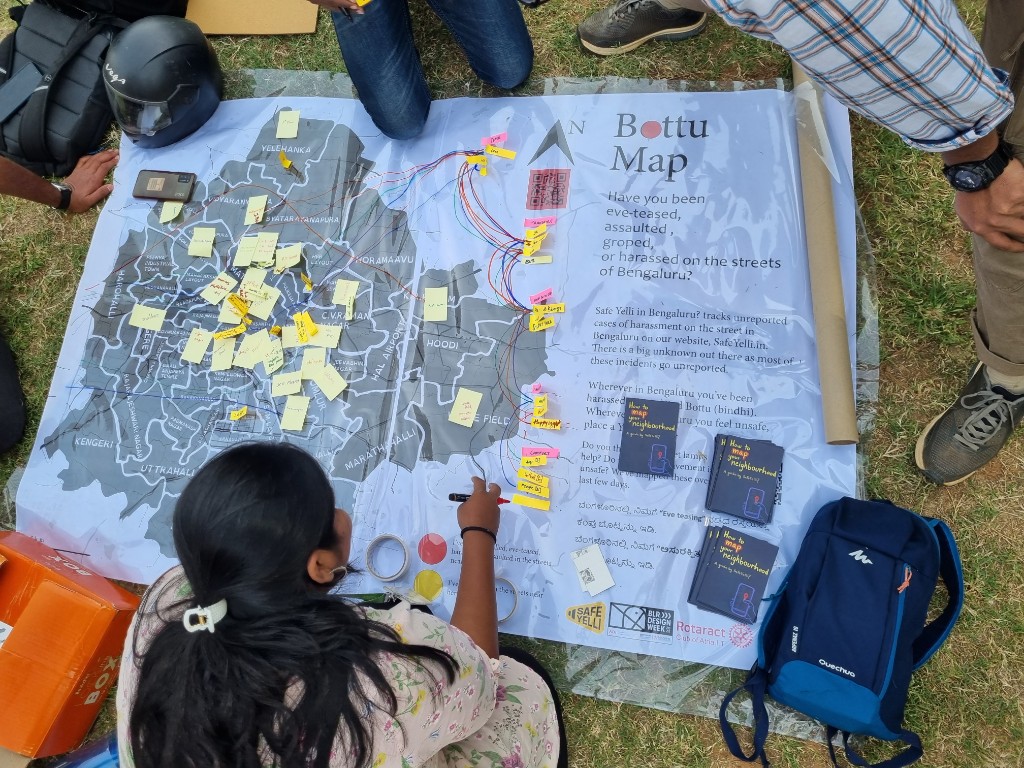
Mapping for Accountability
Grassroots initiative empowering residents to document and address local safety concerns
Hebbala Community Mapping
Neighborhood-focused project building localized safety intelligence through resident participation
Structured Data Collection
Organized workshops and mapping sessions to gather comprehensive safety insights
Platform Integration
Seamlessly integrated community-generated data into SafeYelli's main mapping interface
Community Mapping Initiatives — SafeYelli
Impact: Community mapping initiatives validated our crowdsourced data model and strengthened trust in the platform's grassroots approach.
The Result

Research Outcomes & Impact

The research-driven approach resulted in a product that resonates with user needs and demonstrates measurable impact on women's safety and confidence when navigating urban spaces.

50K+
Active Users
Monthly active
25K+
Safety Reports
Community contributions
150K+
Routes Planned
Safe navigation paths

Success Metrics

Quantifiable results demonstrating the platform's impact on user safety and engagement

89%
Users report feeling safer
When actively using the app for navigation
78%
Weekly geomapping usage
Most engaged feature across all user segments
92%
Task completion rate
For safety-related tasks and reporting
71%
Choose safer routes
Even when they take longer to destination

Key Research Learnings

Critical insights that shaped product decisions and feature development

1
Geomapping Insights

The geospatial analysis revealed that safety perceptions vary significantly by time of day and day of week. Areas considered safe during daytime often had different safety scores in evenings. This temporal dimension became a critical feature in our heat mapping algorithm.

  • Safety scores fluctuate by up to 40% between day and night
  • Weekends show different patterns than weekdays
  • Transit hubs correlate with higher incident reporting
2
Behavioral Patterns

Diary studies and contextual inquiry uncovered unconscious safety behaviors that users had developed over time. Understanding these existing coping mechanisms helped us design features that augmented rather than replaced learned behaviors.

  • 71% of women choose longer routes if they feel safer
  • Users rely heavily on visual cues (lighting, crowd presence)
  • Sharing location with trusted contacts reduces anxiety by 65%

This project reinforced a belief I now carry into every design engagement: the best interfaces don't feel designed at all. They feel like someone finally understood you. SafeYelli worked because we listened first — and designed second.

— Reflection on the SafeYelli project
View Live Site safeyelli.in